mirror of
https://github.com/farcasclaudiu/skills-copilot-codespaces-vscode.git
synced 2026-06-22 07:01:50 +03:00

57 lines
2.0 KiB
Markdown
57 lines
2.0 KiB
Markdown
<!--
|
|
<<< Author notes: Step 2 >>>
|
|
Start this step by acknowledging the previous step.
|
|
Define terms and link to docs.github.com.
|
|
-->
|
|
|
|
## Step 2: Seeing AI code suggestions in a Javascript file!
|
|
|
|
_Nice work! :tada: You created a Codespace using a devcontainer file that installed Copilot!_
|
|
|
|
GitHub Copilot provides suggestions for numerous languages and a wide variety of frameworks, but works especially well for Python, JavaScript, TypeScript, Ruby, Go, C# and C++. The following samples are in JavaScript, but other languages will work similarly.
|
|
|
|
Let's try this out utilizing Javascript for Copilot.
|
|
|
|
### :keyboard: Activity: Add a Javascript file and start writing code
|
|
|
|
1. From inside the codespace in the VS Code explorer window, create a new file.
|
|
|
|
> **Note**:
|
|
> If you closed the Codespace from above, please open it back up or create a new Codespace.
|
|
|
|
2. Name the file `skills.js`
|
|
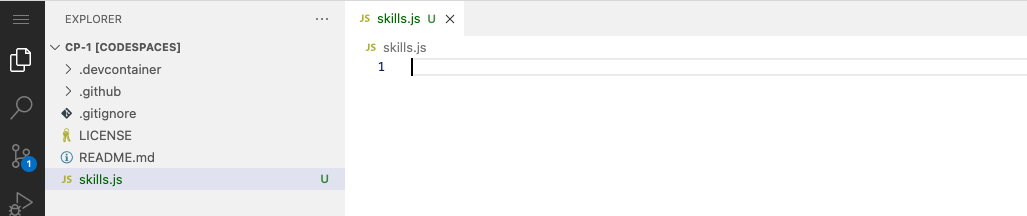
3. Verify your new file looks like:
|
|
|
|
4. In the `skills.js` file, type the following function header.
|
|
|
|
```
|
|
function calculateNumbers(var1, var2)
|
|
```
|
|
|
|
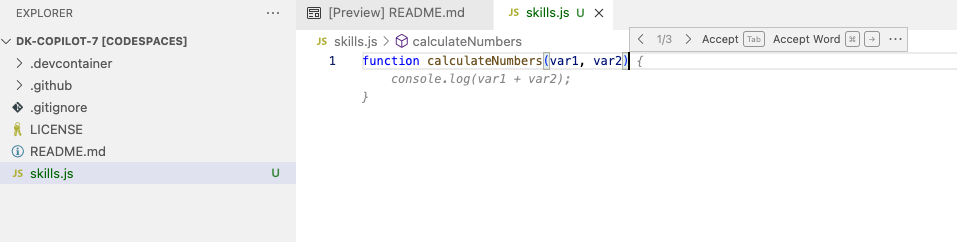
GitHub Copilot will automatically suggest an entire function body in grayed text. Below is an example of what you'll most likely see, but the exact suggestion may vary.
|
|
|
|
|
|
5. Press `Tab` to accept the suggestion.
|
|
|
|
### :keyboard: Activity: Push code to your repository from the codespace
|
|
|
|
1. Use the VS Code terminal to add the `skills.js` file to the repository:
|
|
|
|
```
|
|
git add skills.js
|
|
```
|
|
|
|
2. Next from the VS Code terminal stage and commit the changes to the repository:
|
|
|
|
```
|
|
git commit -m "Copilot first commit"
|
|
```
|
|
|
|
3. Finally from the VS Code terminal push to code to the repository:
|
|
|
|
```
|
|
git push
|
|
```
|
|
|
|
**Wait about 60 seconds then refresh your repository landing page for the next step.**
|