 Vinod Kiran
40e36d1b39
Vinod Kiran
40e36d1b39
* datasource: initial commit

* datasource: datasource details and chunks

* datasource: Document Store Node

* more changes

* Document Store - Base functionality

* Document Store Loader Component

* Document Store Loader Component

* before merging the modularity PR

* after merging the modularity PR

* preview mode

* initial draft PR

* fixes

* minor updates and  fixes

* preview with loader and splitter

* preview with credential

* show stored chunks

* preview update...

* edit config

* save, preview and other changes

* save, preview and other changes

* save, process and other changes

* save, process and other changes

* alpha1 - for internal testing

* rerouting urls

* bug fix on new leader create

* pagination support for chunks

* delete document store

* Update pnpm-lock.yaml

* doc store card view

* Update store files to use updated storage functions, Document Store Table View and other changes

* ui changes

* add expanded chunk dialog, improve ui

* change throw Error to InternalError

* Bug Fixes and removal of subFolder, adding of view chunks for store

* lint fixes

* merge changes

* DocumentStoreStatus component

* ui changes for doc store

* add remove metadata key field, add custom document loader

* add chatflows used doc store chips

* add types/interfaces to DocumentStore Services

* document loader list dialog title bar color change

* update interfaces

* Whereused Chatflow Name and Added chunkNo to retain order of created chunks.

* use typeorm order chunkNo, ui changes

---------

Co-authored-by: Henry <hzj94@hotmail.com>
Co-authored-by: Henry Heng <henryheng@flowiseai.com>
7.0 KiB

Flowise - LLM アプリを簡単に構築





ドラッグ&ドロップでカスタマイズした LLM フローを構築できる UI
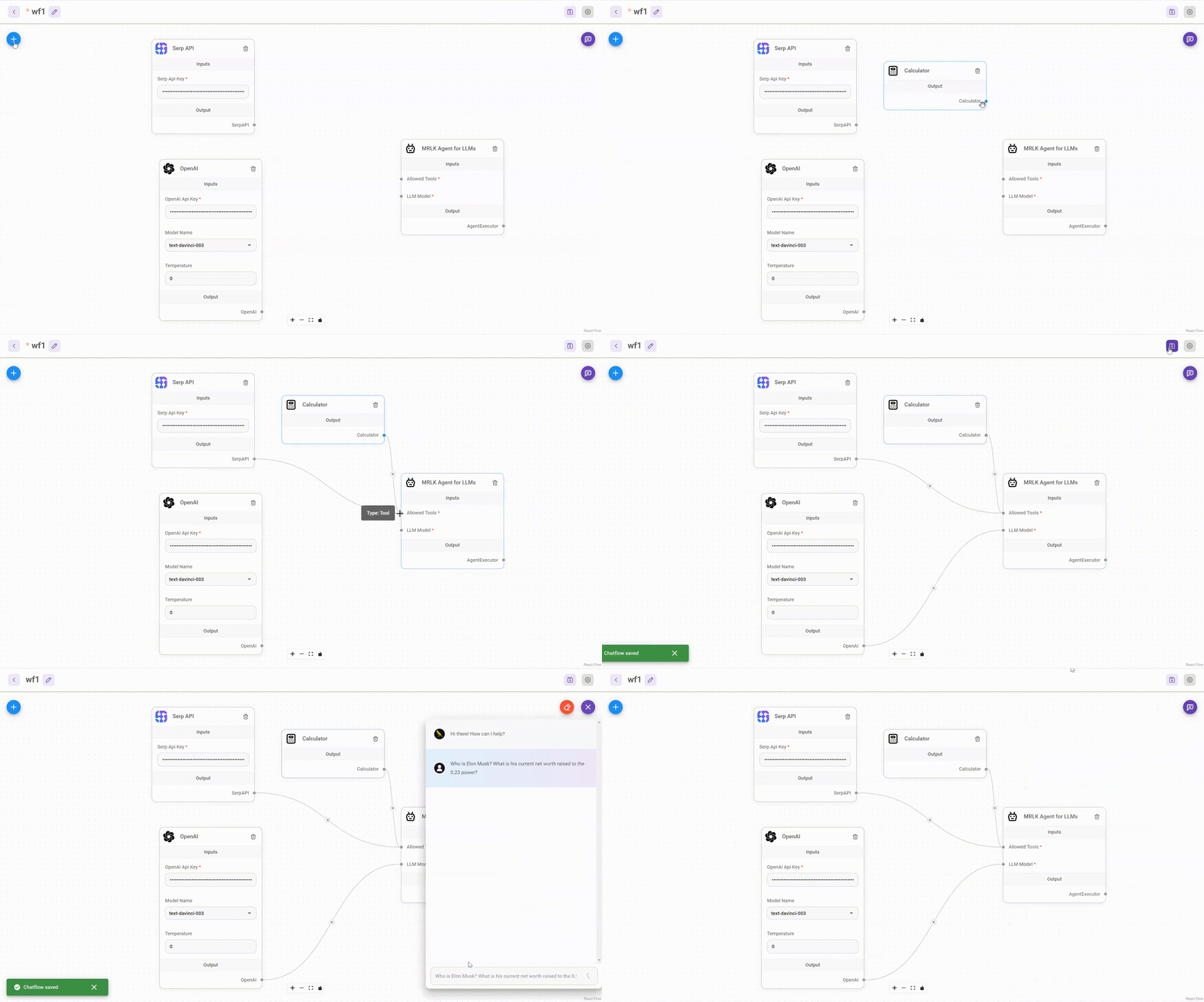
⚡ クイックスタート
NodeJS >= 18.15.0 をダウンロードしてインストール
-
Flowise のインストール
npm install -g flowise -
Flowise の実行
npx flowise startユーザー名とパスワードを入力
npx flowise start --FLOWISE_USERNAME=user --FLOWISE_PASSWORD=1234
🐳 Docker
Docker Compose
- プロジェクトのルートにある
dockerフォルダに移動する .env.exampleファイルをコピーして同じ場所に貼り付け、名前を.envに変更するdocker-compose up -d- http://localhost:3000 を開く
- コンテナを停止するには、
docker-compose stopを使用します
Docker Image
-
ローカルにイメージを構築する:
docker build --no-cache -t flowise . -
image を実行:
docker run -d --name flowise -p 3000:3000 flowise -
image を停止:
docker stop flowise
👨💻 開発者向け
Flowise には、3 つの異なるモジュールが 1 つの mono リポジトリにあります。
server: API ロジックを提供する Node バックエンドui: React フロントエンドcomponents: サードパーティノードとの統合
必須条件
- PNPM をインストール
npm i -g pnpm
セットアップ
-
リポジトリをクローン
git clone https://github.com/FlowiseAI/Flowise.git -
リポジトリフォルダに移動
cd Flowise -
すべてのモジュールの依存関係をインストール:
pnpm install -
すべてのコードをビルド:
pnpm build -
アプリを起動:
pnpm starthttp://localhost:3000 でアプリにアクセスできるようになりました
-
開発用ビルド:
-
.envファイルを作成し、packages/uiにVITE_PORTを指定する(.env.exampleを参照) -
.envファイルを作成し、packages/serverにPORTを指定する(.env.exampleを参照) -
実行
pnpm dev
コードの変更は http://localhost:8080 に自動的にアプリをリロードします
-
🔒 認証
アプリレベルの認証を有効にするには、 FLOWISE_USERNAME と FLOWISE_PASSWORD を packages/server の .env ファイルに追加します:
FLOWISE_USERNAME=user
FLOWISE_PASSWORD=1234
🌱 環境変数
Flowise は、インスタンスを設定するためのさまざまな環境変数をサポートしています。packages/server フォルダ内の .env ファイルで以下の変数を指定することができる。続きを読む
📖 ドキュメント
🌐 セルフホスト
お客様の既存インフラに Flowise をセルフホストでデプロイ、様々なデプロイをサポートします






💻 クラウドホスト
近日公開
🙋 サポート
ご質問、問題提起、新機能のご要望は、discussionまでお気軽にどうぞ
🙌 コントリビュート
これらの素晴らしい貢献者に感謝します
コントリビューティングガイドを参照してください。質問や問題があれば、Discord までご連絡ください。
📄 ライセンス
このリポジトリのソースコードは、Apache License Version 2.0の下で利用可能です。